If you use Gmail for personal communication, business outreach, newsletters, or customer follow-ups, one question matters before you start sending at scale: how many emails can Gmail send per day?
In 2026, the answer depends on the type of Gmail account you use and how you send your messages. A standard personal Gmail account generally has a limit of 500 outgoing messages per day, while work, school, and Google Workspace Individual accounts generally have a daily sending limit of 2,000 outgoing messages. Gmail also applies separate limits to its Mail Merge feature.
These limits exist primarily to reduce spam, abuse, and automated account activity. Reaching a limit can temporarily prevent you from sending additional messages, so understanding Gmail’s rules is important if email is part of your daily business workflow.
Gmail Daily Sending Limits in 2026
Here is a simple overview:
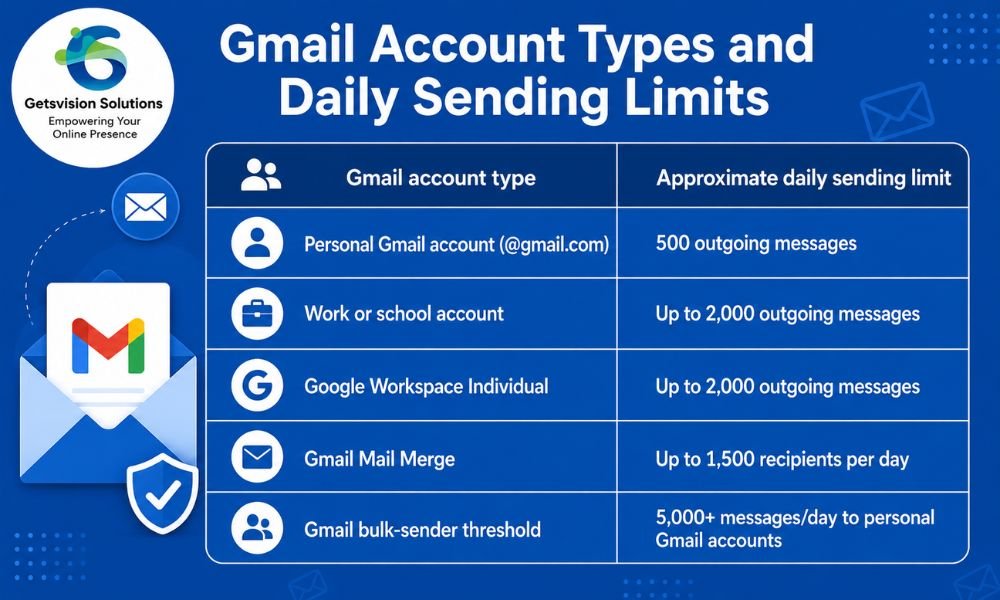
Google’s current Gmail documentation states that standard Gmail accounts have a daily limit of 500 outgoing messages. Work, school, and Workspace Individual accounts have a daily limit of 2,000 outgoing messages.
However, 2,000 does not mean you should treat Gmail as a bulk-email platform. Your actual ability to send can be affected by account status, recipient limits, bounce rates, spam complaints, and other anti-abuse systems.
How Many Emails Can a Personal Gmail Account Send?
For a standard personal Gmail account, the commonly applicable limit is 500 outgoing emails in a day.
Google says you may encounter the “You have reached a limit for sending mail” message if you send more than 500 emails in a day or send a single email to more than 500 recipients.
For example, sending 500 individual messages to 500 different recipients can put you at the daily limit. Similarly, using large recipient lists can trigger Gmail’s recipient restrictions even if you have not sent 500 separate messages.
If you hit the limit, Gmail says you should generally be able to send again within 1 to 24 hours.
How Many Emails Can Google Workspace Send?
Google Workspace accounts are designed for professional use and have a higher sending capacity than standard personal Gmail accounts.
For most work, school, and Workspace Individual accounts, Google currently lists a 2,000 outgoing-message daily limit.
This makes Workspace more suitable for business communication, but it still does not make Gmail equivalent to a dedicated email marketing or bulk-mailing service.
If your company regularly needs to send thousands or tens of thousands of promotional emails, using Gmail itself may create unnecessary deliverability and operational problems. A dedicated email delivery platform or SMTP infrastructure is generally more appropriate for that type of workload.
What Is Gmail Mail Merge’s Daily Limit?
Gmail’s Mail Merge feature has its own restrictions.
Eligible Workspace plans can use Mail Merge to personalize messages and send them to multiple recipients. Google currently allows up to 1,500 recipients per day through Mail Merge, with up to 1,500 recipients added to the “To” line for a message.
For example, Google explains that you could send:
- 1,000 Mail Merge messages to recipients
- Another 500 Mail Merge messages
- Total: 1,500 Mail Merge recipients
But there is an important distinction: Mail Merge operates within the account’s overall sending capacity. For most eligible work, school, and Workspace Individual accounts, the total daily sending limit is 2,000. Once 1,500 combined sends have been used for regular and Mail Merge messages, additional Mail Merge sending is blocked until the quota resets, while the remaining capacity is reserved for regular email.
Does BCC Let You Send More Emails?
No.
Using BCC is not a legitimate way to bypass Gmail’s sending limits. Recipients in the To, CC, and BCC fields can count toward Gmail’s sending calculations.
Google gives an example in which a Mail Merge message sent to 500 recipients with one BCC recipient can consume 1,000 units of the daily sending limit because the BCC recipient receives a copy of each outgoing message.
Therefore, simply putting hundreds of addresses into BCC is not a reliable strategy for mass email.
Why Does Gmail Limit Email Sending?
Gmail’s sending restrictions are designed to protect users and the broader email ecosystem.
High-volume sending can be associated with:
- Spam
- Compromised accounts
- Automated abuse
- Invalid recipient lists
- High bounce rates
- Unwanted promotional messages
- Poor sender reputation
Gmail may also restrict or temporarily suspend sending when a large number of messages cannot be delivered. Google specifically recommends checking recipient addresses because a high volume of bounced or undeliverable messages can contribute to sending problems.
For businesses, this means that sending fewer emails to engaged recipients is usually better than simply trying to maximize the number of emails sent each day.
What Happens If You Exceed Gmail’s Sending Limit?
If you exceed your applicable sending limit, Gmail may display a message indicating that you have reached the sending limit.
In many cases, the restriction is temporary. Google says users should generally be able to send again within 1 to 24 hours.
If your business depends on email, repeatedly reaching the limit can become a serious operational issue. Transactional messages, customer responses, password resets, invoices, and other important communications may be affected.
That is why businesses should plan email infrastructure around expected volume rather than waiting until Gmail starts rejecting messages.
What About Sending 5,000 Emails Per Day?
There is another important number to understand in 2026: 5,000 messages.
Google defines a bulk sender as a sender that sends close to 5,000 or more messages to personal Gmail accounts within a 24-hour period. Messages sent from the same primary domain are considered together when Google determines whether the sender meets this threshold.
This does not mean Gmail suddenly gives an account permission to send 5,000 messages.
Instead, the 5,000-message figure is a threshold associated with Google’s requirements for bulk senders. Google says bulk senders need to authenticate outgoing email, avoid unwanted or unsolicited email, and make unsubscribing easy for recipients. Google also states that enforcement against non-compliant traffic has been increasing.
Therefore, businesses sending large volumes should pay close attention to authentication and deliverability.
How to Send More Emails Without Hurting Deliverability
If your legitimate business requirement is greater than Gmail’s normal sending capacity, don’t simply create multiple Gmail accounts and distribute the messages among them.
Instead, consider a professional email infrastructure designed for your sending volume.
For example, businesses can use dedicated SMTP infrastructure, reputable email APIs, or specialized bulk-email platforms. The right solution depends on whether your messages are transactional, marketing-related, or a combination of both.
Before increasing volume, focus on:
- Email authentication — Configure SPF, DKIM, and DMARC correctly.
- List quality — Remove invalid, inactive, and unwanted addresses.
- Permission — Send marketing email only to recipients who have appropriate permission.
- Gradual volume increases — Avoid sudden spikes in sending.
- Bounce monitoring — Investigate unusually high bounce rates.
- Spam complaints — Treat complaints as an important warning signal.
- Unsubscribe functionality — Give marketing recipients a straightforward way to stop receiving promotional emails.
- Sender reputation — Monitor how mailbox providers respond to your traffic.
If you are troubleshooting delivery problems, your guide on how to improve email deliverability is a natural next resource for understanding these factors.
You can also learn more about SPF vs. DKIM vs. DMARC before increasing your sending volume.
Gmail vs. Dedicated SMTP for Bulk Email
Gmail is excellent for normal person-to-person and business communication. It is not necessarily the right infrastructure for large-scale email campaigns.
Suppose a company needs to send 20,000 promotional messages. Trying to distribute that volume across ordinary Gmail accounts can create account-management, compliance, and deliverability problems.
A dedicated SMTP server or professional email delivery service can provide infrastructure designed around higher-volume sending, queue management, bounce handling, analytics, authentication, and reputation management.
The key is not simply “How can I send the maximum number of emails?”
The better question is:
“How can I send the volume my business needs while maintaining good deliverability and complying with Gmail’s requirements?”
Frequently Asked Questions
Can Gmail send 1,000 emails per day?
A standard personal Gmail account generally cannot send 1,000 outgoing messages per day because its stated daily limit is 500. Eligible work, school, and Workspace Individual accounts have a higher overall limit of 2,000, although Mail Merge has a separate 1,500-recipient daily limit.
Can Gmail send 2,000 emails per day?
Eligible work, school, and Workspace Individual accounts have a stated daily limit of 2,000 outgoing messages. However, other restrictions and Mail Merge-specific limits may apply.
Can I send 5,000 emails from Gmail?
You should not interpret Google’s 5,000-message bulk-sender threshold as a Gmail account sending allowance. Google uses 5,000 messages to personal Gmail accounts within 24 hours as the threshold for identifying bulk senders and applying additional sender requirements.
Does Gmail’s limit reset at midnight?
You should not assume that your quota is simply a calendar-day counter. Google’s user-facing documentation describes the restriction as a daily sending limit and says that after reaching it, you should generally be able to send again within 1 to 24 hours.
Is Gmail suitable for bulk email marketing?
Gmail can be useful for small-scale, legitimate outreach and business communication, but it is not a substitute for professional bulk-email infrastructure. If you regularly send large marketing campaigns, a dedicated email marketing platform or properly configured SMTP/email API solution is usually more appropriate.
Final Takeaway
So, how many emails can Gmail send per day in 2026?
For a standard personal Gmail account, the practical published limit is 500 outgoing messages per day. For most work, school, and Workspace Individual accounts, the published limit is 2,000 outgoing messages per day. Gmail Mail Merge has a separate 1,500-recipient daily limit, while Google’s 5,000-message threshold applies to identifying bulk senders sending to personal Gmail accounts—not as a general Gmail sending allowance.
For occasional communication, Gmail is more than capable. For sustained high-volume marketing or transactional email, however, the smarter approach is to use appropriate email infrastructure, authenticate your domain, maintain a clean recipient list, monitor deliverability, and follow Google’s sender requirements.
In short: don’t optimize only for how many emails Gmail lets you send. Optimize for how many legitimate emails you can successfully deliver.