Email is one of the most important communication channels for businesses, but it is also a major target for phishing, spoofing, and other forms of email abuse. If someone can impersonate your domain, they may send fraudulent messages that appear to come from your company, damaging your reputation and putting customers at risk.
This is where SPF, DKIM, and DMARC come in.
These three email authentication standards work together to help receiving mail servers determine whether a message is genuinely authorized by your domain. Although each protocol has a different job, using all three provides stronger protection, better visibility, and a more trustworthy sending infrastructure.
For businesses that depend on email marketing, transactional messages, sales outreach, or bulk email, understanding these technologies is essential.
What Is SPF?
SPF, or Sender Policy Framework, is an email authentication method that tells receiving mail servers which servers are authorized to send email on behalf of your domain.
SPF works through a TXT record in your domain’s DNS settings. The record contains a list of authorized sending servers or services.
For example, if your business sends email through your own SMTP server and a third-party email platform, your SPF record can identify those authorized systems. When a recipient’s mail server receives your message, it checks whether the sending server is included in your domain’s SPF policy.
If it is authorized, the SPF check can pass. If it is not, the message may fail SPF authentication.
Why SPF Matters
SPF can help reduce domain spoofing and gives receiving mail providers an additional signal for evaluating your messages.
However, SPF has an important limitation: it authenticates the sending infrastructure, not the visible “From” address by itself. SPF can also become complicated when a business uses multiple email providers, because DNS SPF records have a limit of 10 DNS lookups.
That means SPF is useful, but it should not be treated as a complete email security solution.
What Is DKIM?
DKIM, or DomainKeys Identified Mail, takes a different approach.
DKIM adds a cryptographic signature to outgoing emails. The sending mail server uses a private key to generate the signature, while the corresponding public key is published in your domain’s DNS.
When the recipient’s mail server receives the email, it can retrieve the public key and verify the signature.
If the message has not been improperly altered and the signature is valid, DKIM provides evidence that the message was authorized by the domain associated with the signature.
Why DKIM Matters
DKIM is particularly valuable because it can help establish message integrity and domain identity even when an email passes through different mail systems.
For example, businesses commonly use SMTP servers, email marketing platforms, CRM systems, and transactional email providers. Correctly configured DKIM allows those services to authenticate email using your domain.
If you’re managing an email infrastructure, understanding the underlying delivery system is equally important. A useful resource is this comprehensive guide to SMTP services, which explains how SMTP fits into business email delivery.
DKIM also works closely with DMARC, which brings us to the third part of the authentication framework.
What Is DMARC?
DMARC stands for Domain-based Message Authentication, Reporting, and Conformance.
While SPF and DKIM provide authentication mechanisms, DMARC adds a policy and reporting layer.
A DMARC policy is published as a DNS TXT record and tells receiving mail servers what to do when an email fails DMARC authentication.
A business can typically use policies such as:
- p=none — monitor authentication results without asking recipients to reject or quarantine messages.
- p=quarantine — request that failing messages be treated suspiciously, commonly by placing them in spam or quarantine.
- p=reject — request that failing messages be rejected.
DMARC also provides reporting capabilities, allowing domain owners to gain insight into authentication failures and potential unauthorized use of their domains.
SPF vs DKIM vs DMARC: The Key Difference
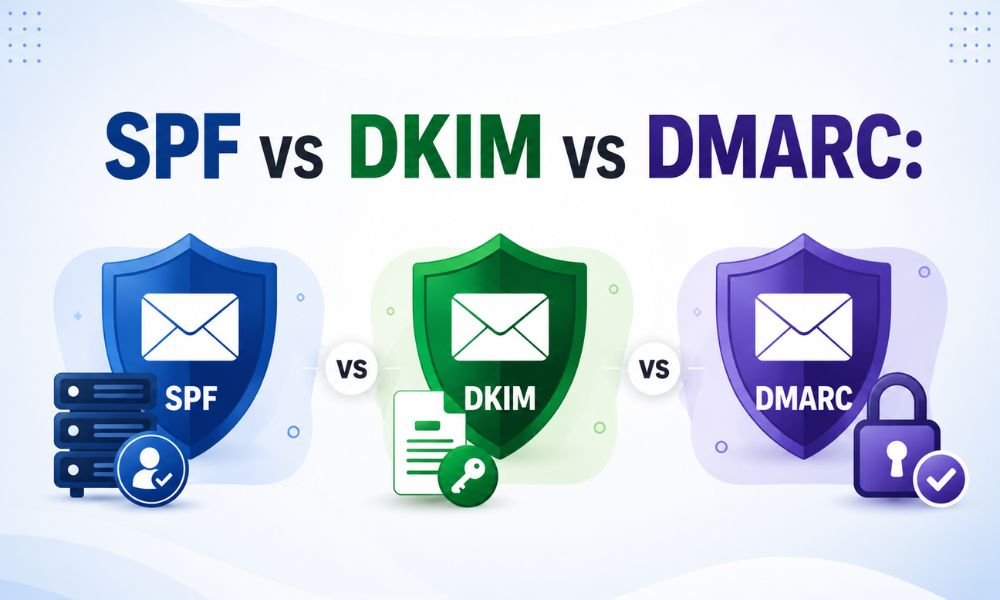
The simplest way to understand the three protocols is to think about them as different layers of email authentication.
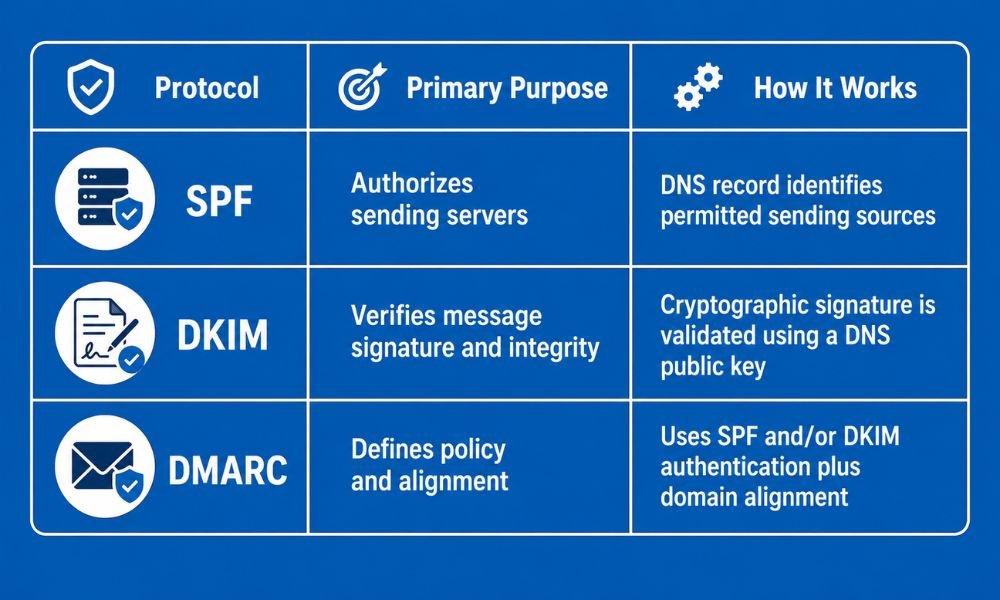
In other words, SPF asks, “Is this sending server authorized?”
DKIM asks, “Does this message have a valid domain-based signature?”
DMARC asks, “Does the message authenticate in alignment with the visible From domain, and what should happen if it doesn’t?”
That distinction is important because SPF and DKIM by themselves don’t provide the complete policy and reporting capabilities of DMARC.
Why Do You Need SPF, DKIM, and DMARC Together?
Using just one authentication method leaves gaps.
SPF can identify authorized sending servers, but it does not cryptographically sign the message. DKIM can authenticate a message through a signature, but it doesn’t tell receiving servers what action to take when authentication fails. DMARC uses authentication results and alignment to establish a policy for your domain.
Together, they create a much stronger framework.
1. Better Protection Against Spoofing
Attackers can attempt to impersonate your business by sending messages that appear to come from your domain.
SPF, DKIM, and DMARC make it more difficult for unauthorized messages to successfully authenticate as legitimate domain mail.
2. Improved Domain Reputation
Email providers evaluate multiple signals when deciding how to handle incoming messages. Proper authentication helps establish that your organization has legitimate control over its sending domain.
Authentication alone does not guarantee inbox placement, but it is an important part of responsible email infrastructure.
If you’re troubleshooting delivery problems, it is also worth examining other factors such as SMTP configuration, bounce rates, sender reputation, content quality, and recipient engagement.
3. Greater Visibility
DMARC reporting can help organizations identify legitimate email sources and discover unauthorized systems attempting to send messages using their domain.
This is especially useful for companies that send email through several platforms.
4. Stronger Brand Trust
When customers receive legitimate messages from your domain, authentication helps reduce the opportunity for criminals to impersonate your business.
For companies sending newsletters, promotions, invoices, password resets, and other important communications, protecting the domain is part of protecting the customer experience.
How to Set Up SPF, DKIM, and DMARC
A practical implementation usually follows these steps.
Step 1: Identify every legitimate sending source.
Make a list of your SMTP servers, email marketing platforms, CRM tools, transactional email services, and other systems that send email using your domain.
Step 2: Configure SPF.
Create or update the SPF TXT record to authorize your legitimate sending sources. Avoid creating multiple SPF records for the same domain.
Step 3: Enable DKIM.
Your email provider will generally provide DKIM records or keys that need to be added to DNS. After publishing them, verify that outgoing messages are being signed correctly.
Step 4: Publish a DMARC record.
Start with a monitoring policy such as p=none while you analyze authentication reports and identify legitimate sources.
Step 5: Fix authentication failures.
Investigate legitimate services that fail SPF, DKIM, or DMARC alignment. Update DNS or provider settings where necessary.
Step 6: Gradually strengthen your DMARC policy.
Once legitimate sending sources consistently authenticate, you can consider moving from monitoring toward quarantine and eventually rejection.
Don’t rush this step. A poorly configured DMARC policy can potentially affect legitimate business email.
Common Mistakes to Avoid
One of the biggest mistakes is assuming that adding an SPF record automatically solves email deliverability problems.
It doesn’t.
Businesses should also avoid creating multiple SPF records, forgetting to authenticate newly added email platforms, ignoring DKIM configuration, or moving directly to a strict DMARC policy without monitoring legitimate senders.
Another mistake is confusing email authentication with email deliverability. Authentication is important, but inbox placement also depends on sender reputation, recipient engagement, list quality, bounce rates, spam complaints, content, and technical configuration.
For businesses managing high-volume email, reviewing how to monitor email bounce rates with advanced analytics can provide additional insight into delivery performance.
SPF, DKIM, and DMARC: A Simple Example
Imagine your company sends an invoice to a customer.
SPF checks whether the server sending the invoice is authorized to send email for your domain.
DKIM checks whether the email carries a valid cryptographic signature associated with your domain.
DMARC checks whether authentication aligns with the domain shown to the recipient and applies your published policy if the message fails.
When all three are correctly configured, the receiving mail provider has stronger evidence that the email is legitimate.
Final Thoughts
SPF, DKIM, and DMARC are not competing technologies. They solve different problems and work best as a combined email authentication strategy.
SPF authorizes sending sources. DKIM provides a verifiable digital signature. DMARC adds alignment, policy enforcement, and reporting.
For businesses that rely on email, implementing all three can strengthen domain protection, improve visibility into sending activity, and create a more trustworthy email infrastructure.
The best approach is to configure authentication carefully, monitor the results, fix legitimate sending issues, and only then move toward stricter DMARC enforcement.
Most importantly, don’t treat email authentication as a one-time DNS task. As your business adds new SMTP servers, marketing platforms, CRM systems, and transactional services, your authentication setup should be reviewed and maintained accordingly.
Author/Reviewer Note: To strengthen E-E-A-T, publish this article with an identifiable author or technical reviewer, relevant credentials or experience, an author/about page, and a clear last-reviewed date. Google recommends making authorship and the “Who, How, and Why” of content clear to readers.