Email bounce rate is one of the most useful metrics for understanding the health of an email campaign. A high bounce rate can indicate outdated contact data, invalid addresses, technical delivery problems, or weaknesses in the way an email list is collected and maintained.
However, simply looking at one percentage after every campaign is not enough. Effective email monitoring means understanding why emails bounced, which subscribers were affected, whether the problem is increasing, and what action should be taken next.
For businesses that depend on email marketing, transactional messages, newsletters, or bulk email campaigns, advanced analytics can turn bounce data into actionable insights.
What Is an Email Bounce Rate?
An email bounce occurs when a message cannot be successfully delivered to the recipient’s mail server.
The basic bounce-rate calculation is:
Bounce Rate = (Number of Bounced Emails ÷ Total Emails Sent) × 100
For example, if you send 10,000 emails and 300 cannot be delivered, your bounce rate is 3%.
But the percentage alone doesn’t tell the complete story. You should also identify whether those failures are hard bounces or soft bounces.
Hard Bounces
A hard bounce usually indicates a permanent delivery problem. Common causes include:
- Non-existent email addresses
- Invalid domains
- Permanently closed mailboxes
- Incorrectly entered addresses
Repeatedly sending to addresses that generate permanent failures can damage the quality of your mailing list.
Soft Bounces
Soft bounces are generally temporary. They can happen because of:
- A recipient’s mailbox being full
- Temporary server problems
- Message-size limitations
- Temporary receiving-server restrictions
- Rate or delivery limitations
A soft bounce doesn’t always mean the address should immediately be removed. Instead, monitor whether the same address repeatedly fails.
Why Monitoring Bounce Rates Matters
Bounce monitoring isn’t only about improving campaign statistics.
Poor-quality recipient data can contribute to wasted sending volume, inaccurate campaign reporting, and potential deliverability problems. Gmail, for example, recommends monitoring server responses, spam rates, and domain reputation and advises senders to reduce sending volume when bounces or deferrals begin increasing.
That makes bounce analytics valuable for three reasons:
- List health: You can identify invalid or deteriorating addresses.
- Delivery diagnostics: You can detect technical problems affecting campaigns.
- Decision-making: You can determine when to suppress, verify, retry, or investigate recipients.
1. Track Hard and Soft Bounces Separately
One of the first improvements you can make is separating permanent and temporary delivery failures.
If your dashboard reports only a total bounce percentage, you may miss an important pattern.
For example:
Campaign A: 2.5% total bounces, mostly temporary failures
Campaign B: 2.5% total bounces, mostly permanent failures
The percentages are identical, but the recommended response is completely different.
A campaign with many hard bounces may require list cleaning or verification. A campaign with a sudden increase in soft bounces may require investigation into server responses, sending volume, or recipient-side restrictions.
2. Monitor Bounce Trends Instead of One Campaign
Don’t evaluate bounce rate in isolation.
Create a historical view showing:
- Daily bounce rate
- Weekly bounce rate
- Monthly bounce rate
- Hard-bounce percentage
- Soft-bounce percentage
- Bounce rate by campaign
- Bounce rate by sending domain
- Bounce rate by recipient domain
Trend analysis can reveal problems that individual campaign reports hide.
For example, a bounce rate that increases from 1% to 1.3% to 1.8% over several campaigns deserves attention even if the latest campaign doesn’t appear disastrous.
A sudden spike is also worth investigating, particularly when it coincides with a new campaign, new data source, infrastructure change, or increase in sending volume.
3. Analyze Bounce Rates by Recipient Domain
Advanced analytics should allow you to break delivery failures down by recipient domain.
Compare performance across domains such as:
- Gmail
- Outlook
- Yahoo
- Corporate domains
- Educational domains
- Regional or business-specific domains
This helps answer an important question:
Is the problem affecting the entire campaign or a particular receiving ecosystem?
If bounces suddenly increase only for one major recipient group, investigate the SMTP response codes and delivery logs before assuming the entire mailing list is unhealthy.
Gmail’s Postmaster Tools provides senders with information about delivery errors, spam rates, authentication, and domain or IP reputation for mail sent to personal Gmail accounts.
4. Watch SMTP Response Codes
Bounce analytics becomes much more useful when it includes the technical response associated with each failed message.
Instead of simply seeing:
Email failed
you want information that helps answer:
Why did it fail?
SMTP responses can help distinguish between invalid recipients, temporary restrictions, authentication-related problems, reputation issues, and other delivery failures.
Your email platform or SMTP provider should ideally provide delivery logs containing timestamps, recipient information, response codes, and failure categories.
This makes it easier to identify whether a problem originates from your list, infrastructure, or recipient server.
5. Identify Repeat Bounces
Another valuable metric is the number of subscribers who repeatedly generate delivery failures.
For example:
- One soft bounce → monitor
- Several consecutive soft bounces → investigate
- Permanent hard bounce → suppress or remove
The exact suppression rules should depend on your sending system and the reason for failure.
This approach prevents your analytics platform from treating every bounce as an isolated event.
Instead, you can identify recipient-level patterns and make better list-management decisions.
6. Connect Bounce Data With List Quality
Bounce monitoring should not operate separately from subscriber management.
If a campaign has a high bounce rate, ask where the addresses came from.
Potential sources include:
- Website signup forms
- Lead-generation campaigns
- CRM imports
- Older databases
- Offline data collection
- Third-party integrations
If one acquisition source consistently produces more invalid addresses than others, the problem may begin before the email campaign is even created.
Using appropriate email verification processes can help businesses identify invalid addresses before they become recurring delivery problems. For a deeper explanation of the process and its benefits, see our guide to email verification and maintaining a healthier email list.
7. Compare Bounce Rate With Other Metrics
Bounce rate becomes more meaningful when viewed alongside other campaign indicators.
Build a dashboard that includes:
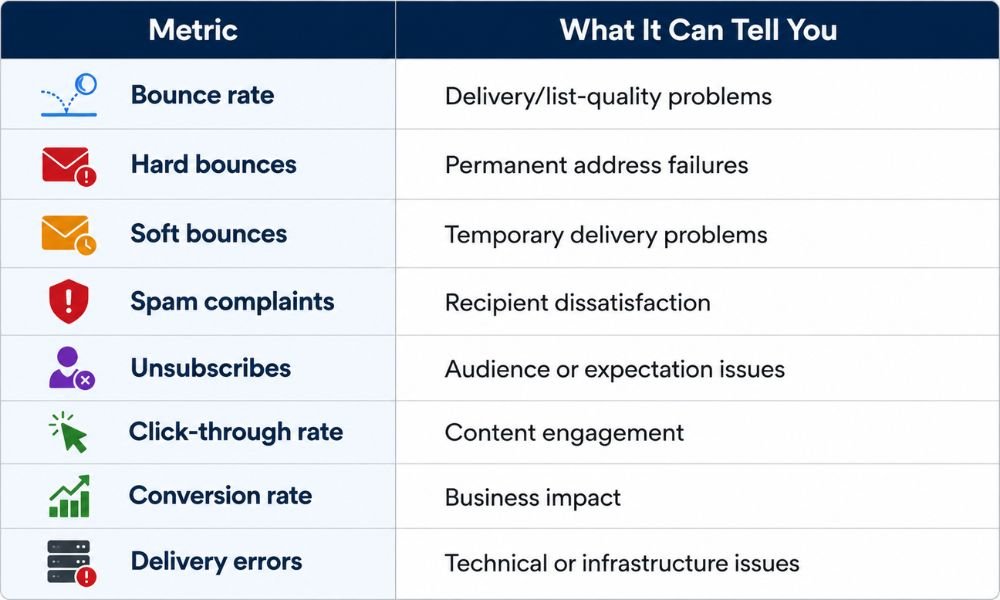
This prevents a common mistake: treating bounce rate as the only measure of email health.
For example, a low bounce rate combined with rising spam complaints can indicate an audience-relevance problem rather than a list-quality problem.
8. Set Alerts for Abnormal Changes
You don’t want to discover a delivery problem weeks after it begins.
Set automated alerts when:
- Bounce rates exceed your normal baseline
- Hard bounces suddenly increase
- A particular recipient domain starts failing
- SMTP errors increase sharply
- One campaign behaves differently from your historical average
- A new sending source produces unusual failures
The important point is to establish your normal baseline first.
A 2% bounce rate might represent a significant deterioration for one sender but an improvement for another. Context matters.
9. Use Analytics to Take Action
Analytics is valuable only when it leads to decisions.
A useful workflow is:
Collect → Segment → Compare → Diagnose → Act → Monitor
For example:
Collect: Campaign reports show a bounce increase.
Segment: Separate hard and soft bounces.
Compare: Check the increase against previous campaigns.
Diagnose: Review SMTP responses and recipient domains.
Act: Suppress invalid addresses and investigate technical failures.
Monitor: Track subsequent campaigns to confirm whether the problem improves.
This turns bounce reporting from a passive statistic into an operational process.
How Advanced Bounce Analytics Supports Deliverability
Bounce rate is only one part of the larger email-deliverability picture.
Authentication, sender reputation, subscriber permission, sending consistency, content quality, and infrastructure all influence whether messages reach recipients successfully.
For example, Gmail recommends that senders maintain consistent sending rates, avoid sudden volume spikes, monitor delivery responses, and keep reported spam rates low.
That means bounce analytics should be part of a broader monitoring system rather than a standalone KPI.
If your organization is already experiencing messages being filtered into spam, combine bounce analysis with authentication, reputation, engagement, and sending-behavior checks. Our guide on why emails go to spam and how to troubleshoot common causes can help you investigate those additional factors.
Final Thoughts
Monitoring email bounce rates effectively requires more than checking a percentage after every campaign.
The strongest approach is to analyze hard versus soft bounces, historical trends, recipient domains, SMTP responses, repeat failures, list sources, and related engagement metrics.
Advanced analytics tools make this process easier by bringing those signals into one place and allowing marketers to identify changes before they become larger delivery problems.
Most importantly, don’t treat every bounce as the same.
A permanent invalid address, a temporary mailbox problem, and a recipient-domain delivery restriction require different responses. When your analytics system helps you understand those differences, you can clean your list more intelligently, investigate technical problems faster, and make better email-sending decisions.
The goal isn’t simply to achieve a low bounce percentage. The real objective is to build a clean, permission-based, measurable, and consistently monitored email program that supports reliable delivery and long-term sender health.