If you have ever needed to send the same email, letter, invitation, invoice, or business update to hundreds of people, you know how time-consuming it can be to personalize every message manually. Mail merge solves this problem by combining a single message template with a list of recipient information, allowing you to create personalized communications at scale.
Instead of writing “Hello John” and “Hello Sarah” separately, a mail merge tool can automatically insert each recipient’s name and other relevant details into the same message. This makes communication faster while still giving recipients a more personal experience.
For businesses, marketers, educators, recruiters, and organizations, mail merge can be a practical way to improve productivity without sacrificing personalization.
What Is Mail Merge?
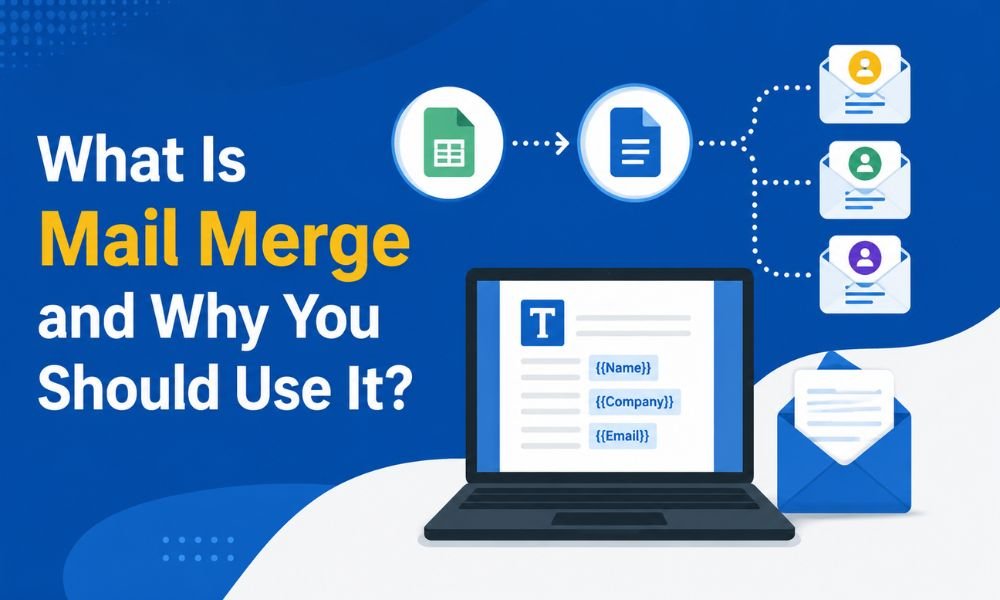
Mail merge is a process that combines a main document or email template with a data source, such as a spreadsheet or contact list. The data source typically contains information such as names, email addresses, company names, locations, order details, or other fields.
For example, imagine you have a spreadsheet containing:
- Customer name
- Email address
- Company
- Product purchased
- Renewal date
You can create one email template containing fields such as:
Hello [First Name], your subscription for [Product] is scheduled for renewal on [Renewal Date].
During the mail merge process, the software replaces those fields with the correct information for each recipient. The result is a series of individualized messages generated from one template.
Mail merge is therefore different from simply sending one identical message to a large group. The goal is to combine efficiency with personalization.
How Does Mail Merge Work?
Although the exact process depends on the software you use, most mail merge systems follow a similar workflow.
1. Prepare Your Contact List
Start with a clean and accurate database. A spreadsheet is often sufficient for basic campaigns.
Your list may include columns such as:
| First Name | Company | Offer | |
|---|---|---|---|
| Rahul | rahul@example.com | ABC Ltd | 20% Discount |
| Priya | priya@example.com | XYZ Ltd | Free Consultation |
Make sure email addresses are valid and that your contacts have appropriate permission to receive your communications.
2. Create Your Message Template
Write the email, letter, or document you want to send. Keep the main content consistent while identifying areas that should be personalized.
Common merge fields include:
- First name
- Last name
- Company name
- Job title
- Location
- Order number
- Appointment date
- Personalized offer
3. Connect Your Data
The mail merge application connects your template with the contact list. It then matches each merge field with the corresponding column in your data source.
4. Preview the Messages
Always preview several records before sending. This helps identify problems such as missing names, incorrect fields, formatting errors, or broken personalization.
5. Send or Generate the Documents
Once everything looks correct, the system can generate personalized emails or documents for the selected recipients.
Why Should Businesses Use Mail Merge?
The biggest advantage of mail merge is that it eliminates repetitive work. However, its value extends beyond saving time.
Saves Time and Improves Productivity
Manually creating hundreds of personalized emails can consume hours. Mail merge lets you create the core message once and automatically personalize it for multiple recipients.
This allows teams to spend more time on strategy, customer relationships, and other high-value activities.
Makes Communication More Personal
Personalization can make a generic communication feel more relevant. Including a recipient’s name, company, purchase information, or other appropriate details can create a more direct experience.
For example, a message saying:
“Hello Amit, here is an update regarding your recent order.”
is generally more personal than:
“Dear Customer, here is an update regarding your order.”
However, personalization should be meaningful rather than excessive. Using too many fields simply to make an email appear personalized can reduce trust.
Reduces Manual Errors
Copying and pasting information repeatedly creates opportunities for mistakes. Mail merge automates the repetitive portion of the process and can reduce errors caused by manually entering names, addresses, dates, or other information.
You should still validate your source data because automation cannot correct incorrect information in your database.
Supports Sales and Marketing Activities
Mail merge can be useful for outreach, follow-ups, event invitations, customer updates, surveys, and other legitimate business communications.
For larger email campaigns, however, a dedicated email marketing platform may provide more advanced functionality, such as segmentation, automation, unsubscribe management, analytics, and deliverability controls. Businesses evaluating their options can also review these free email marketing platforms and hacks before selecting a solution.
Helps Maintain Consistent Branding
A central template makes it easier to maintain consistent messaging, formatting, calls to action, and brand language. Teams can create an approved template and personalize only the information that needs to change.
Consistency is particularly valuable when multiple employees communicate with customers or prospects.
Common Mail Merge Use Cases
Mail merge is not limited to email. It can support many everyday business and organizational tasks.
Sales outreach: Create personalized introductions for qualified prospects while keeping the core message consistent.
Event invitations: Send invitations containing the recipient’s name, event information, registration details, or location.
Customer notifications: Personalize account updates, renewal reminders, service announcements, and transactional communications.
Invoices and statements: Generate documents containing customer names, invoice numbers, balances, and payment dates.
Recruitment: Send personalized interview invitations, application updates, or follow-up communications.
Education: Schools and training organizations can use mail merge for certificates, notices, student communications, and administrative documents.
Direct mail: A single document template can be combined with postal addresses to generate personalized letters, labels, or envelopes.
Mail Merge vs. Mass Email: What Is the Difference?
Mail merge and mass email are related, but they are not identical.
Mass email generally means distributing one campaign or message to many recipients, often through an email marketing platform.
Mail merge focuses on combining a template with recipient-specific data to generate individualized messages or documents.
For example, sending the exact same newsletter to 5,000 subscribers is a mass-email activity. Sending 500 personalized appointment letters with different names and dates is a typical mail merge task.
Modern email marketing platforms can combine elements of both approaches by providing personalization, segmentation, automation, and campaign reporting.
Does Mail Merge Affect Email Deliverability?
Mail merge itself does not automatically guarantee good deliverability. Your sending practices, recipient engagement, authentication, content, list quality, sending infrastructure, and reputation can all affect whether messages reach inboxes.
Before sending communications at scale, businesses should maintain clean contact lists and avoid sending unsolicited messages. It is also important to understand the technical side of email delivery, including SMTP configuration and authentication.
If messages are consistently landing in spam, reviewing the common causes of emails going to spam can help identify potential problems.
For larger campaigns, consider using appropriate email infrastructure and monitoring bounce rates, complaints, and engagement instead of simply increasing sending volume.
Best Practices for Successful Mail Merge
To get better results from mail merge, follow these practical guidelines:
- Use accurate data. Clean your contact list before starting.
- Personalize appropriately. Use relevant information rather than unnecessary personalization.
- Proofread the template. One mistake can appear in every generated message.
- Test before sending. Send test messages and preview multiple recipient records.
- Segment your audience. Different groups may need different messaging.
- Respect consent and privacy. Send communications only when you have an appropriate legal and business basis to do so.
- Include a clear purpose. Recipients should immediately understand why they received the message.
- Monitor results. Track useful metrics such as delivery, bounces, replies, and conversions where applicable.
Final Thoughts
Mail merge is a straightforward but powerful productivity technique. By connecting a reusable template with structured recipient data, businesses can create personalized communications without manually preparing every individual message.
Its main benefits include time savings, personalization, consistency, scalability, and fewer repetitive data-entry tasks. Whether you are sending customer updates, invitations, business letters, invoices, or carefully targeted outreach, mail merge can simplify the process considerably.
However, effective mail merge is not simply about sending more messages. The best results come from accurate data, relevant personalization, responsible sending practices, thoughtful content, and reliable email infrastructure.
When used correctly, mail merge gives organizations a practical balance between automation and human-like communication—helping teams communicate efficiently while keeping each recipient’s experience relevant and professional.