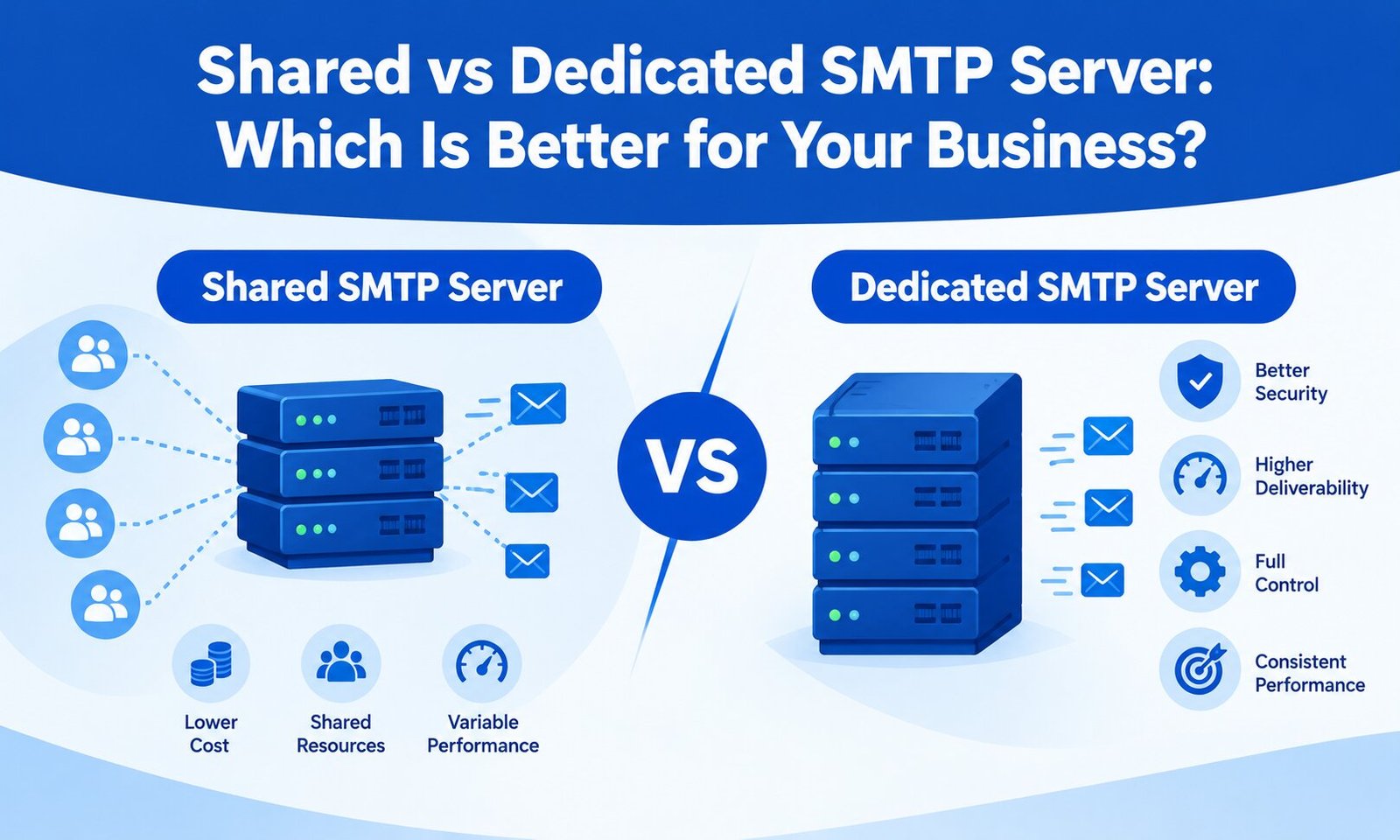
Choosing between a shared and dedicated SMTP server can directly affect your email delivery, infrastructure costs, and ability to scale your business. Whether you send order confirmations, password resets, newsletters, or promotional campaigns, the right SMTP setup helps you manage email communication more reliably.
However, shared and dedicated SMTP servers serve different needs. A shared server is often suitable for businesses starting with a limited budget, while a dedicated SMTP server offers greater control over sending infrastructure and reputation management.
In this guide, we compare both options to help you decide which SMTP solution best fits your business requirements.
What Is a Shared SMTP Server?
A shared SMTP server allows multiple businesses to send emails through the same email infrastructure. The service provider manages the server and distributes its resources among customers.
This setup is common with cloud-based email delivery platforms because businesses can start sending emails without managing their own server.
Benefits of Shared SMTP Servers
1. Lower initial costs
Shared SMTP services are generally more affordable because infrastructure and maintenance costs are distributed across multiple customers. They can be a practical choice for startups, small businesses, and companies with moderate email volumes.
2. Easy setup and management
Most providers offer SMTP credentials, documentation, dashboards, and integration options. Businesses can connect their websites, CRM systems, or applications without configuring an entire mail server.
3. Less technical maintenance
The provider typically manages server updates, infrastructure monitoring, and routine maintenance. This reduces the operational workload for businesses without dedicated IT teams.
Limitations of Shared SMTP Servers
The main consideration is that your sending environment is shared with other customers. Depending on the provider’s architecture, shared IP reputation can be influenced by other senders’ behavior.
A poorly managed shared environment may experience deliverability challenges if other customers generate excessive complaints, invalid addresses, or spam-like traffic.
However, sharing infrastructure does not automatically mean poor deliverability. Reputable providers monitor abuse, enforce sending policies, and manage their IP pools to protect service quality.
What Is a Dedicated SMTP Server?
A dedicated SMTP server provides an email-sending environment reserved for one customer. Depending on the service, this may include a dedicated IP address, dedicated server resources, or a separately managed sending infrastructure.
Businesses often consider dedicated SMTP solutions when they need more control over sending practices, reputation, and email operations.
Benefits of Dedicated SMTP Servers
1. Greater control over sender reputation
With a dedicated IP address, your IP reputation is primarily influenced by your own sending behavior rather than unrelated customers sharing that IP.
This control can be valuable for businesses with consistent sending volumes and strong email list management practices.
2. More control over sending configuration
Depending on the provider, dedicated infrastructure may offer greater flexibility over sending limits, queues, throttling, routing, and monitoring.
This can help businesses manage high-volume campaigns and time-sensitive transactional emails.
3. Better separation of email traffic
Companies can design separate sending streams for transactional and marketing emails. This separation helps reduce the risk that problems in one sending stream will affect the other, although it requires appropriate configuration and does not guarantee inbox placement.
4. Greater scalability for established senders
Businesses with predictable, growing email volumes may benefit from dedicated infrastructure that supports their operational requirements and provides more visibility into sending performance.
Limitations of Dedicated SMTP Servers
Dedicated SMTP infrastructure generally involves higher costs or additional management responsibilities. Some services also require technical expertise to configure authentication, monitor queues, manage sending rates, and troubleshoot delivery issues.
A dedicated IP address also needs careful warm-up when introduced for a new sending domain or sending program. Sending large volumes immediately can harm its reputation.
Most importantly, dedicated infrastructure does not guarantee that emails will reach the inbox. Authentication, list quality, recipient engagement, and compliance with mailbox-provider policies remain essential.
Shared vs Dedicated SMTP Server: Key Differences
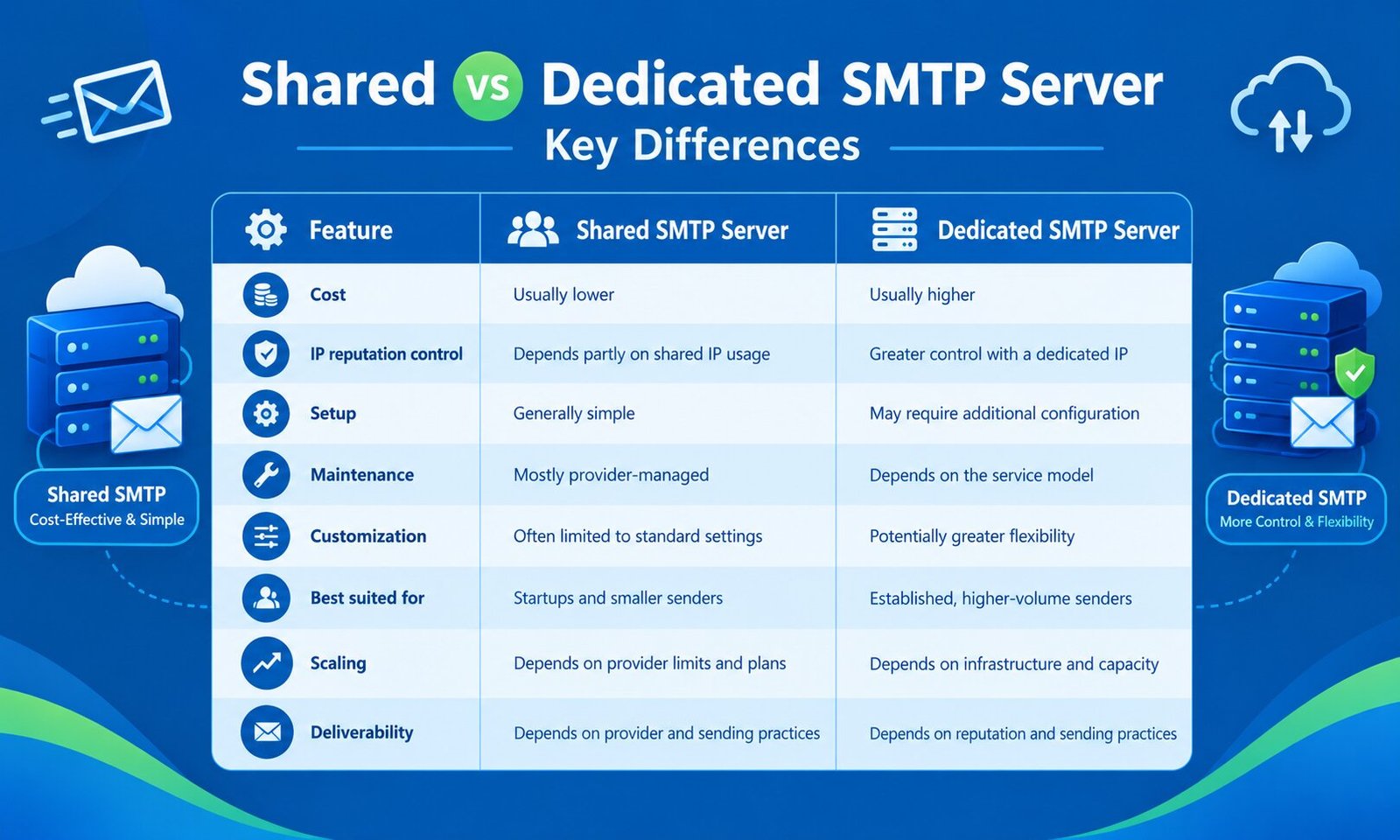
The exact differences depend on the provider. Some shared SMTP platforms offer advanced analytics and strong deliverability controls, while some dedicated SMTP services are fully managed and require little technical maintenance.
Which SMTP Server Is Better for Your Business?
The right choice depends on your email volume, sending consistency, budget, technical capabilities, and business objectives.
Choose a Shared SMTP Server If:
- You run a startup or small business.
- Your email volume is relatively low or variable.
- You want to minimize infrastructure costs.
- You prefer a managed service with simple integration.
- You do not need extensive control over sending infrastructure.
For example, a small online store sending order confirmations, shipping updates, and occasional promotional emails may find a reputable shared SMTP platform sufficient.
Choose a Dedicated SMTP Server If:
- You send substantial, consistent email volumes.
- Email delivery is important to your core business operations.
- You need greater control over IP reputation.
- You require advanced sending configuration or monitoring.
- You have the resources to manage sending practices and reputation.
For example, a SaaS company sending product notifications or an established e-commerce business handling large numbers of customer communications may benefit from dedicated infrastructure, depending on its requirements.
If you are comparing infrastructure options for high-volume campaigns, review our guide to a dedicated SMTP server for bulk mailing to understand where dedicated sending may fit your strategy.
What Should You Check Before Choosing an SMTP Provider?
Before purchasing a plan, evaluate more than the advertised sending limit.
Pricing and limits: Compare monthly costs, per-email charges, overage fees, daily limits, and scaling options.
Deliverability monitoring: Look for bounce tracking, complaint monitoring, delivery logs, and useful reporting tools.
Authentication support: Confirm support for SPF, DKIM, and DMARC configuration. Proper authentication helps mailbox providers verify your sending domain.
Reputation management: Ask whether the service uses shared or dedicated IPs, how it handles abuse, and whether dedicated IP warm-up guidance is available.
Technical support: Check whether support is available when you experience blocks, throttling, configuration errors, or sudden delivery problems.
Integration options: Ensure the service works with your website, CRM, e-commerce platform, or application.
You should also understand how SMTP rate limits and email sending throttling affect your campaigns. Even a capable server can experience delays if your sending rate exceeds provider limits or recipient servers temporarily restrict incoming messages.
Final Verdict: Shared or Dedicated SMTP?
A shared SMTP server is often the sensible starting point for small businesses that need affordable, managed email delivery. A dedicated SMTP server may be the better investment for established senders who need greater control over IP reputation, sending configuration, and infrastructure.
Neither option guarantees better deliverability on its own. The best solution is the one that matches your actual sending volume, budget, technical requirements, and email practices.
Before making a decision, compare provider policies, test integration requirements, review reporting features, and calculate the total cost of ownership. Choosing infrastructure based on measurable business needs will help you build a more reliable and scalable email communication strategy.