If your WordPress website sends contact-form messages, WooCommerce order notifications, password-reset emails, booking confirmations, or other transactional messages, reliable email delivery is essential. Unfortunately, WordPress does not always deliver emails consistently through its default wp_mail() configuration. Messages can be delayed, rejected, or sent straight to spam.
That is where a good WordPress SMTP plugin can help. An SMTP plugin connects WordPress to an authenticated email service or SMTP server, giving your website a more reliable route for outgoing messages.
But which plugin should you choose in 2026? The answer depends on your budget, technical experience, email volume, logging requirements, and preferred mail provider.
In this guide, we compare the best free and paid SMTP plugins for WordPress, including WP Mail SMTP, FluentSMTP, Post SMTP, Easy WP SMTP, and Gravity SMTP.
Quick Comparison: Best WordPress SMTP Plugins in 2026
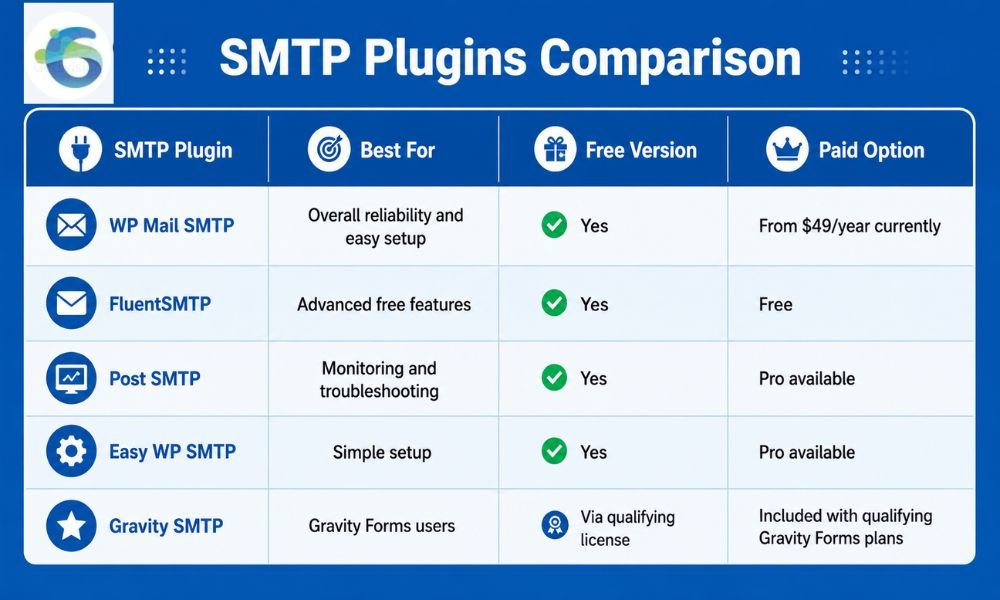
Pricing and feature availability can change, so check the provider’s current pricing before purchasing.
1. WP Mail SMTP – Best Overall Choice
WP Mail SMTP is one of the most established WordPress SMTP solutions and is a strong choice for beginners, businesses, WooCommerce stores, and agencies.
Its main advantage is the combination of a guided setup experience and broad mailer compatibility. You can connect WordPress with services such as Gmail/Google Workspace, Amazon SES, Brevo, Mailgun, SendGrid, Postmark, SMTP2GO, Zoho and other providers.
The free version is sufficient for many websites that simply need to replace unreliable default WordPress email delivery. The Pro version adds features such as email logging, reports, tracking, backup connections, smart routing and failure alerts.
Best for: Businesses that want a dependable, beginner-friendly SMTP plugin with extensive integrations.
Pricing: The current promotional Pro price starts at $49/year for one site, while renewals are at the regular price.
Our verdict: If you do not want to spend time comparing dozens of plugins, WP Mail SMTP is an excellent default choice.
2. FluentSMTP – Best Free SMTP Plugin
If your priority is getting advanced SMTP functionality without paying for a premium license, FluentSMTP deserves serious consideration.
FluentSMTP supports popular email providers and SMTP services and provides useful features such as email logging, multiple connections and fallback options. It is particularly attractive to developers, agencies and website owners managing several types of transactional email.
The plugin is available through WordPress.org and continues to receive updates and user feedback in 2026.
One of its biggest strengths is value. You can get features that some competing plugins reserve for paid plans without adding another annual software subscription to your budget.
Best for: Users who want advanced SMTP functionality while keeping plugin costs at zero.
Pros: Free, flexible, multiple connections, email logging and strong provider compatibility.
Cons: Beginners may find the configuration slightly less guided than the most polished premium alternatives.
Our verdict: FluentSMTP is arguably the best choice for budget-conscious users who still want powerful features.
3. Post SMTP – Best for Email Monitoring
Post SMTP takes a more troubleshooting-focused approach. It is especially useful when simply configuring SMTP is not enough and you need to understand what happens to emails after WordPress attempts to send them.
The plugin supports numerous mailers, including Gmail, Microsoft 365, Amazon SES, Brevo, Zoho Mail, Mailgun, SendGrid, Postmark and others. It also provides tools for diagnostics, email logging and delivery monitoring.
Another interesting feature is its notification ecosystem. Depending on the configuration and plan, administrators can receive alerts through channels such as Slack, Microsoft Teams, SMS or mobile notifications.
That can be valuable for ecommerce websites where a failed order notification or password-reset email could directly affect customers.
Best for: Website owners, developers and businesses that want strong troubleshooting and failure monitoring.
Our verdict: Choose Post SMTP if monitoring and diagnostics matter as much as basic SMTP configuration.
4. Easy WP SMTP – Best for Simplicity
As its name suggests, Easy WP SMTP focuses on making SMTP configuration straightforward.
It supports custom SMTP servers as well as multiple transactional mailers. The plugin can be used with services such as Gmail, Outlook/Microsoft 365, SendGrid, Mailgun, Brevo, Amazon SES, Postmark and SMTP2GO, although some integrations and advanced features are available only in Pro.
Its Pro version adds features including email logs, reports, alerts, backup connections, smart routing and rate limiting.
This makes Easy WP SMTP a practical option if you want a simple starting point but may need more advanced controls as your website grows.
Best for: Beginners and small business websites that want straightforward SMTP configuration.
Our verdict: A good option when ease of setup is more important than having every advanced feature in the free version.
5. Gravity SMTP – Best for Gravity Forms Users
Gravity SMTP is worth considering if your website already relies heavily on Gravity Forms.
Unlike many standalone SMTP plugins, Gravity SMTP is tied to qualifying Gravity Forms licenses rather than being sold as an independent product. According to its documentation, it is currently included at no additional cost for users with qualifying active Gravity Forms licenses.
It can connect Gravity Forms and other WordPress emails to popular mail services, making it a convenient choice for businesses already invested in the Gravity Forms ecosystem.
Best for: Existing Gravity Forms customers.
Our verdict: If you already have a qualifying Gravity Forms license, it is worth testing before buying another SMTP plugin.
Free vs Paid SMTP Plugins: Which Should You Choose?
A free SMTP plugin is usually enough if your primary objective is to make WordPress emails more reliable.
For example, a small company website may only need SMTP for:
- Contact-form notifications
- Password resets
- Website administrator alerts
- Basic WooCommerce notifications
- User registration emails
In these situations, FluentSMTP, WP Mail SMTP Lite, Post SMTP or Easy WP SMTP can be sufficient.
A paid plugin becomes more attractive when email is business-critical. Features such as detailed logs, delivery reports, backup SMTP connections, conditional routing and failure alerts can save significant troubleshooting time.
However, remember that an SMTP plugin is not the same thing as an SMTP service. The plugin manages how WordPress connects to the mail provider; the provider actually handles message delivery.
If you are sending large volumes, choosing the right infrastructure becomes even more important. Our guide to dedicated SMTP servers for bulk mailing explains why high-volume senders may need more robust infrastructure than a standard website SMTP configuration.
What Should You Check Before Choosing an SMTP Plugin?
Do not choose an SMTP plugin based only on its star rating. Consider these factors first.
1. Mailer Compatibility
Check whether the plugin supports your preferred provider. API-based integrations can be preferable when available because they avoid some of the limitations associated with traditional SMTP credentials.
2. Email Logs
Email logging is extremely useful when troubleshooting. If a customer says they never received an order confirmation, you want to know whether WordPress actually attempted to send it.
3. Backup Connections
For important ecommerce and business websites, a backup mailer can provide additional resilience if the primary service becomes unavailable.
4. Authentication and Security
Look for secure authentication options such as OAuth where supported. Avoid unnecessarily storing sensitive SMTP credentials when a more secure API-based integration is available.
5. DNS Authentication
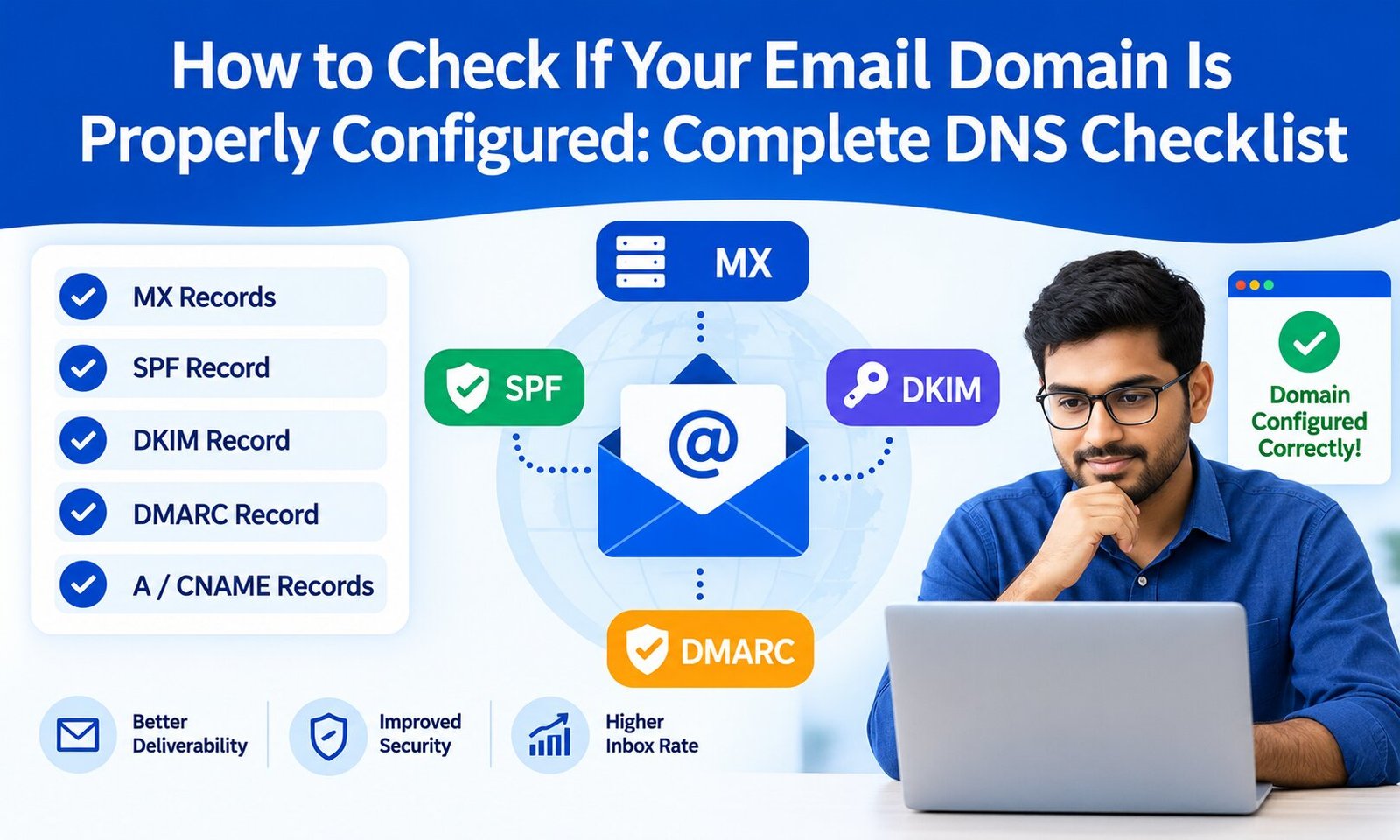
An SMTP plugin alone cannot solve every deliverability problem. Your sending domain should also be configured correctly with authentication records such as SPF, DKIM and DMARC. Understanding the differences between SPF, DKIM and DMARC can help you build a stronger email authentication setup.
6. Support and Updates
WordPress, PHP and email providers continuously change. Choose a plugin that is actively maintained and compatible with current WordPress versions.
How to Improve WordPress Email Deliverability After Installing SMTP
Installing an SMTP plugin is only the first step.
Start by verifying your sending domain with your email provider. Configure SPF, DKIM and DMARC correctly, then send test messages to Gmail, Outlook and other major mailbox providers.
Next, check your WordPress email logs and investigate failed messages. If your website sends marketing or high-volume emails, monitor bounce rates, spam complaints and domain reputation.
Also make sure your From address uses a domain that you control and have properly authenticated. Avoid constantly changing sending domains or addresses, particularly when sending significant volumes.
For larger campaigns, a dedicated transactional email service or SMTP infrastructure may be more appropriate than relying on a personal Gmail or standard hosting mailbox.
Final Verdict: Which WordPress SMTP Plugin Is Best in 2026?
There is no single SMTP plugin that is perfect for every WordPress website.
WP Mail SMTP is our strongest overall recommendation for users who want a polished setup experience, broad provider support and optional premium deliverability tools.
FluentSMTP is the standout choice for users who want powerful SMTP functionality without paying for a premium plugin.
Post SMTP is particularly attractive when diagnostics, logs and delivery alerts are important.
Easy WP SMTP is a sensible option for beginners who prioritize straightforward configuration.
And if you already use Gravity Forms, Gravity SMTP deserves consideration because qualifying Gravity Forms licenses include access to it.
Most importantly, remember that an SMTP plugin improves the connection between WordPress and your mail provider, but it does not automatically guarantee inbox placement. Domain authentication, sender reputation, email content, bounce management and the quality of your SMTP provider all influence deliverability.
For most small businesses, the best approach is simple: choose a well-maintained SMTP plugin, connect it to a reputable transactional mail service, authenticate your domain correctly, test your emails, and monitor delivery over time. That combination provides a much stronger foundation for reliable WordPress email in 2026.