Sending the same email to a large group can save time, but simply adding hundreds of addresses to Gmail is not always the best approach. If you are contacting customers, leads, subscribers, or business prospects, you need to consider Gmail’s sending limits, personalization, deliverability, consent, and the right SMTP or email-sending platform.
For beginners, Getsvision Solutions recommends choosing the sending method based on your audience size and campaign requirements rather than treating Gmail as a full-scale bulk email platform.
This guide explains how to send mass emails through Gmail and compares practical SMTP and email-sending options for businesses.
Can You Send Mass Emails Directly From Gmail?
Yes, but Gmail has limits.
Google currently states that standard Gmail accounts have a daily sending limit of 500 outgoing messages, while eligible Google Workspace accounts can have a higher daily limit. Gmail’s built-in mail merge feature can also support personalized campaigns on eligible Workspace plans.
That means Gmail can work well for a small announcement, customer communication, or limited outreach campaign. However, sending thousands of marketing emails directly from a normal Gmail inbox is not the right strategy.
For larger campaigns, a dedicated email marketing platform or SMTP provider gives you greater control over sending, authentication, tracking, bounces, and deliverability.
How to Send Mass Emails in Gmail
1. Prepare a Permission-Based Email List
Before sending anything, clean your recipient list.
Use contacts who have opted in to receive your communications or who have a legitimate reason to receive the message. Avoid purchased, scraped, or outdated lists.
Google recommends obtaining appropriate consent for commercial or bulk email and providing recipients with a way to unsubscribe where applicable.
A clean list also reduces bounced messages and protects your sender reputation.
2. Use Gmail Mail Merge for Personalized Campaigns
If your Google Workspace plan supports Gmail’s mail merge feature, you can use it to personalize emails.
Open Gmail and:
- Click Compose.
- Add your recipients.
- Select Use mail merge next to the recipient field.
- Turn on Mail Merge.
- Insert personalization fields such as
@firstname,@lastname, or@fullname. - Review your message carefully.
- Send the campaign.
Gmail can also connect mail merge with a spreadsheet so that recipient information can be used for personalization. Each recipient receives an individual copy rather than seeing the entire recipient list.
This is particularly useful for small business announcements, invitations, newsletters, and personalized customer communication.
3. Avoid Using BCC for Large Marketing Campaigns
BCC may appear to be an easy way to send one email to many people, but it is not an ideal bulk-email solution.
Large BCC campaigns can make personalization difficult and provide little campaign-level visibility into delivery, engagement, bounces, or complaints.
For professional marketing campaigns, a dedicated email service or SMTP infrastructure is generally more appropriate.
Gmail vs SMTP Providers: Which Is Better?
The right solution depends on your sending volume and goals.
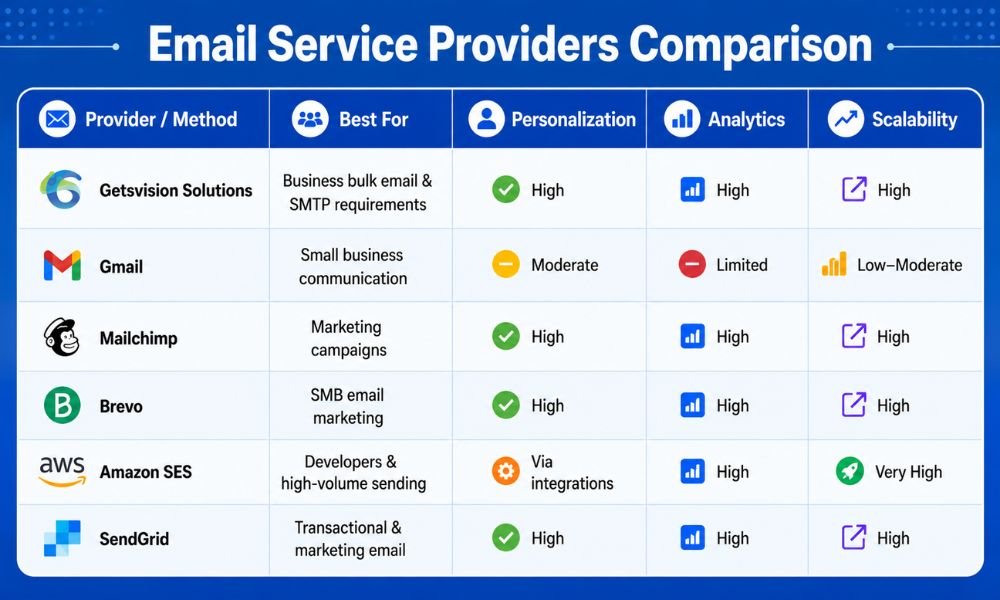
1. Getsvision Solutions
Getsvision Solutions is a practical option for businesses looking for SMTP and bulk-email infrastructure rather than relying entirely on a standard Gmail inbox.
It can be a better fit when your requirements include higher-volume email delivery, dedicated SMTP infrastructure, campaign support, and greater control over sending.
Businesses evaluating different SMTP approaches can also compare infrastructure requirements before moving away from Gmail.
2. Gmail
Gmail is excellent for everyday business communication and smaller campaigns. Its interface is familiar, setup is simple, and eligible Workspace users can use mail merge for personalized outreach.
However, Gmail is not designed to replace a dedicated high-volume SMTP platform.
3. Mailchimp
Mailchimp is primarily an email marketing platform rather than a traditional SMTP server. It is useful for marketers who need campaign templates, audience management, automation, reporting, and subscriber management.
It can be suitable for businesses that want a complete marketing interface instead of managing SMTP infrastructure.
4. Brevo
Brevo offers email marketing and transactional messaging capabilities, making it useful for businesses that need automation, contact management, campaigns, and reporting.
It may be a good choice for smaller businesses that want marketing tools alongside email delivery infrastructure.
5. Amazon SES
Amazon Simple Email Service is designed for developers and organizations that need scalable email delivery.
It can be cost-effective for high-volume sending, but it typically requires more technical knowledge than Gmail or a visual email marketing platform. Businesses may need to configure authentication, applications, APIs, monitoring, and related infrastructure.
6. SendGrid
SendGrid provides email delivery infrastructure for transactional and marketing communications. It is particularly useful for businesses that need APIs, SMTP relay capabilities, analytics, and scalable sending.
The best option depends on whether your priority is marketing automation, transactional delivery, SMTP control, or ease of use.
What Should You Check Before Choosing an SMTP Provider?
Don’t choose an SMTP provider based only on price.
Consider these factors:
Deliverability: Your provider should have appropriate infrastructure and policies designed to support reliable delivery.
Authentication: Your sending domain should be properly configured with SPF, DKIM, and, where applicable, DMARC. Google specifically recommends authentication and requires stronger authentication for bulk senders.
Sending capacity: Determine how many emails you need to send per day and month.
Analytics: Look for bounce tracking, delivery information, spam complaints, and campaign performance reporting.
Scalability: Your provider should be able to accommodate future growth without requiring a complete infrastructure change.
Support: Technical assistance can be important when dealing with SMTP errors, DNS configuration, authentication, or deliverability issues.
Gmail Bulk Email Deliverability Best Practices
Sending a large number of messages does not automatically mean they will reach the inbox.
Google recommends avoiding sudden volume spikes, monitoring bounces and deferrals, and reducing sending volume when delivery problems appear.
Follow these best practices:
- Send only to relevant, permission-based recipients.
- Keep your recipient database clean.
- Authenticate your sending domain.
- Avoid misleading subject lines.
- Use a recognizable sender name.
- Include an appropriate unsubscribe option for marketing messages.
- Monitor bounce and spam rates.
- Increase sending volume gradually.
- Avoid sudden changes in sending patterns.
- Keep your email content useful and relevant.
For larger senders, Google’s Postmaster Tools can provide information about delivery errors, spam reports, and other email performance signals.
You can also learn more about SMTP ports and how to choose between 25, 465, and 587 when configuring an SMTP-based sending solution.
Is Gmail Enough for 1,000 Emails?
It depends on the account and the type of sending.
Eligible Gmail mail merge accounts can send up to 1,500 recipients per day through mail merge, subject to the account’s overall sending capacity and feature limitations. Standard Gmail accounts have a lower daily sending limit.
However, sending 1,000 emails is not simply a question of whether Gmail technically permits the volume. You should also consider whether the campaign needs automation, unsubscribe management, detailed analytics, segmentation, bounce handling, and long-term deliverability monitoring.
If these capabilities are important, a dedicated email marketing platform or SMTP provider is usually the more appropriate choice.
Gmail or SMTP: Which Should You Choose?
Choose Gmail when you need to send a relatively small number of personalized messages and want the simplest possible workflow.
Choose an email marketing platform when you need templates, subscriber management, automation, campaign analytics, and easy unsubscribe handling.
Choose an SMTP provider when your business needs greater control over email delivery, transactional messages, application-based sending, or higher-volume campaigns.
For businesses that regularly send bulk email, the decision should be based on deliverability, authentication, infrastructure, analytics, scalability, and compliance—not simply the number of emails you can send.
Final Thoughts
Gmail can be an effective starting point for small-scale mass email campaigns, especially when its mail merge feature is available. But it should not automatically be treated as a replacement for professional bulk-email infrastructure.
For larger campaigns, compare Gmail with dedicated email marketing platforms and SMTP providers based on your actual requirements. A reliable setup should combine a clean permission-based list, appropriate personalization, proper authentication, sensible sending volumes, monitoring, and clear unsubscribe practices.
Most importantly, sending more emails is not the same as achieving better email marketing results. The goal should be reaching the right audience with useful messages while maintaining a strong sender reputation and reliable deliverability.